The 1st graders spent parts of January & February reading books that have won the Caldecott medal. For several of the books, I created journal pages (using Comic Life) that the kids filled out for the books. I chose to use Scribble Press for the journals, because it seemed organized and kid-friendly. The students loved the platform. I need to look more into the teacher settings before doing out next Scribble Press, because I had to type in my account info to each iPad in order to save them, which took a lot of time. Plus, some of them didn't save to my online account correctly. Overall, I thought the books turned out well!
I can't embed the Scribble Press books, but you can browse through them here:
http://www.scribblepress.com/gallery.php?u=acalhoun
We are going to use Scribble Press again to do an activity with the book "It Looked Like Spilt Milk."
Thursday, March 21, 2013

Sick Day
I am home sick today, but got to connect with the kids anyway! This is why I love technology. Most of my classes are inbetween units/projects, and I like being with the kids when they start new things. So I left fun activities for the K-1 & 4th grades, but I went ahead and had 6th graders read through the new project description and pick a topic for research. They are going to create timelines about the evolution or history of something of their interest. I threw out some example topics, and had them start a Google Doc where they'll collect their notes. They put their topic in there and shared it to me.
I was at my computer when the Docs started rolling in, so I was able to comment and ask questions about their topics. I also directed one person to a book on her topic. It was awesome!
Here are some of our conversations:


I was at my computer when the Docs started rolling in, so I was able to comment and ask questions about their topics. I also directed one person to a book on her topic. It was awesome!
Here are some of our conversations:


And, I loved this girl and how sweet she was to ask how I am doing and to wish me well.
Tuesday, February 12, 2013
ABC Book
Here is an ABC made by 3rd graders. We used Keynote on the iPads to create the pages, then took pictures of them and used Bump to transfer them to my iPad. They did all the research using Britannica online and books from the library, and used Google to find the pictures. They learned how to do an advanced search to find free images to use. For the ones that they couldn't find a free image for, they included the URL as a citation. This was my favorite book that the classes made--they had an original & interesting topic and they worked very hard to find words and images and narrow them down to just one per letter. I love it!
To see the whole book, click here.
Thursday, February 7, 2013
Update on Caldecott Journals
The 1st grade students have been hard at work on their Caldecott journals the past two weeks. We are a bit behind schedule since we missed a lot of time with snow days, though. This week we read and journaled about The Snowy Day and My Friend Rabbit. The kids are mostly able to go through all the steps of scanning the QR code or finding it in their history, opening the page in safari, saving the image and importing it into our Scribble Press journals. Honestly, there are some adults that wouldn't be able to do that. I've been so proud of our progress!
Here are a few examples of the students work. I love that one of them read on their snowy day.


Here are a few examples of the students work. I love that one of them read on their snowy day.
Thursday, January 17, 2013
2nd Grade Non-Fiction: Index, Glossary, Contents
The 2nd graders have been practice using the table of contents, index and glossary in non-fiction books. So far, we've used the books in a series called "Animal Safari." These are good starter non-fiction books. I taped QR codes that were linked to "quizzes" about each book--3 comprehension questions and 2 each about contents, index and glossary. Students had to read first, then use the book to answer the questions. Overall, we did okay, but I think the verdict is that we still need more practice. I'm also wondering if using the iPads was distracting for some students, so we are going to try it on paper next week. Also, I think some of them just clicked answers in order to get finished--which will always happen, I guess.
Here are a couple of pictures of kids reading together and answering the questions:




Here are a couple of pictures of kids reading together and answering the questions:


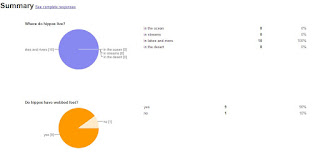
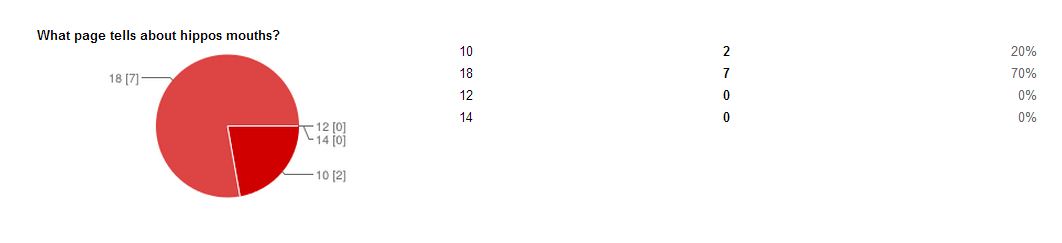
And here are the results from one set of questions. I use Google forms, because the results are so easy to look at!



6th Non-Fiction Text Structures
Sixth graders have been working on recognizing text structures of non-fiction writing--description, sequence/order, compare/contrast, problem/solution, and cause/effect. I gave them this chart, and these paragraphs that I found online, and after determining which text structure it was, they had to create the appropriate graphic organizer. We used "smart art" in Microsoft Word--yes, I had students complete something in Word (we always use Google). I had to finally figure out how to open Word on my laptop! Also, the "smart art" didn't have exact options for a couple of the graphic organizers, but we improvised.
I'm trying to focus on non-fiction more, since it is a huge aspect of Common Core and I feel like our kids lack the skills/desire to read non-fiction. Ideas welcomed :)
Here are a couple:


I'm trying to focus on non-fiction more, since it is a huge aspect of Common Core and I feel like our kids lack the skills/desire to read non-fiction. Ideas welcomed :)
Here are a couple:


Caldecott Journals
1st grade is currently doing a Caldecott unit. I wanted to have the students keep journals, but I hate the idea of printing out sheet after sheet of paper for the 15-20 books that we'll read. So, then I was going to use Keynote and have students create a new slide for each book, but there isn't a lot of room for creativity and drawing in that. So next, I decided to use Scribble Press. That is what I'm sticking with for now, those there are some pitfalls. I explained to the kids that this was going to require lots of patience until we got used to it. The first problem I found was that I couldn't get the text boxes to move after I added one. Also, the eraser erases all of the layers--even over photos. That was a problem because the kids add in a different journal form for each book as an image. So instead of erasing, we used a white marker to go over mistakes. First day was mostly successful, except no one got to the writing part. We rated and drew our favorite pictures. I love the rating system using stars like angry birds. I'm excited to see where this project goes.
I posted a picture of Juli's page for Kitten's First Full Moon.

I posted a picture of Juli's page for Kitten's First Full Moon.
Subscribe to:
Posts (Atom)